Integrating Legacy Systems Without APIs: A Practical Developer's Guide
Six integration patterns for connecting older business applications to modern systems without replacing existing software.
Modern applications usually expose REST APIs, webhooks, or other integration interfaces.
But what happens when a business-critical application has none of these?
Imagine an organization running an older ERP system that manages inventory, orders, and customer information. The company wants to connect it to a modern CRM, but the ERP doesn't expose a usable API.
A complete replacement could take months and introduce unnecessary operational risk.
Fortunately, legacy system integration without APIs is possible.
Developers can use database access, secure file exchanges, message queues, middleware, robotic process automation, and custom adapters to connect systems.
The challenge is selecting an approach that is secure, reliable, and maintainable.
Let's explore the options.
1. Start by Understanding the Legacy System
Before writing integration code, investigate how the existing application works.
Important questions include:
- Does the application support database access?
- Can it export or import files?
- Does it provide scheduled reports?
- Are there supported extension points?
- Can data be accessed through an approved user interface?
- How frequently must information be synchronized?
- Which system owns the authoritative records?
These answers help determine the most suitable integration pattern.
For example, a nightly inventory update may work perfectly with CSV files, while a high-volume transaction workflow may require asynchronous messaging.
Don't introduce a complex architecture when a simpler approach satisfies the requirements.
2. Pattern One: Database-Level Integration
Database integration allows an approved connector to retrieve information directly from the legacy application's data store.
Consider this architecture:
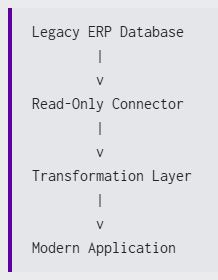
A connector might retrieve new orders, validate them, and pass the information to another system.
Example: Read legacy records using Python
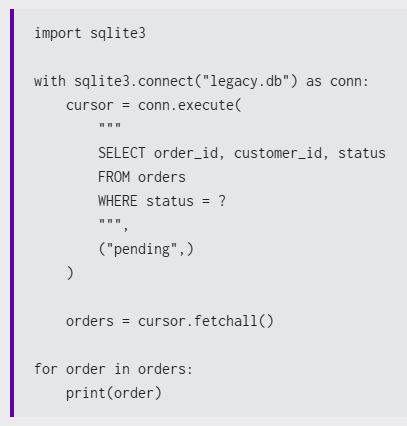
This simplified example demonstrates database reading using SQLite.
In production, use approved access methods, secure credentials, least-privilege permissions, and appropriate monitoring.
Key risks
Database integration can create tight coupling to the existing schema.
Direct database writes may also bypass application validation and business rules.
Prefer read-only queries, supported procedures, staging tables, or change data capture where appropriate.
3. Pattern Two: Secure File Exchange
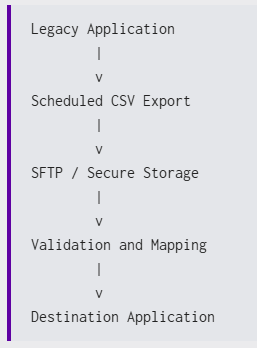
File-based integration is one of the most practical approaches for older applications.
A legacy system exports data as CSV, XML, or JSON. An integration service retrieves the file, validates the records, and transfers the information to another application.
Example: Validate a CSV export
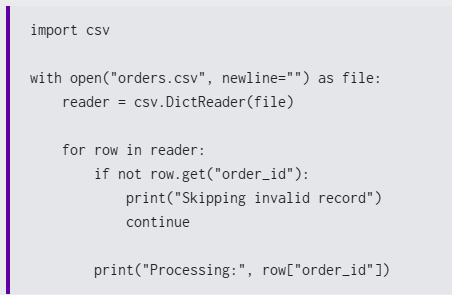
This example only demonstrates basic validation. Production systems need stronger schema checks, error handling, duplicate prevention, and secure delivery.
File exchange works especially well when real-time synchronization is unnecessary.
For reliability, consider:
- File naming conventions.
- Transfer encryption.
- Record validation.
- Duplicate detection.
- Processing logs.
- Retry and recovery procedures.
4. Pattern Three: Message Queues for Asynchronous Processing
Message queues help decouple applications.
Instead of requiring both systems to be available simultaneously, an integration component publishes messages that downstream services process independently.
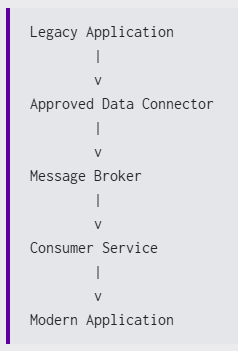
Technologies such as RabbitMQ or Apache Kafka can support this architecture.
However, a message broker doesn't automatically solve the lack of an API.
You still need a supported mechanism to obtain information from the legacy application.
That might be a database connector, file processor, or custom adapter.
Example event
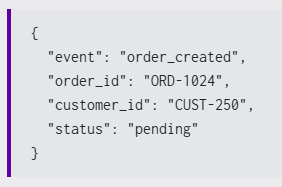
The consumer receives this event and performs the required operation.
Important design considerations
- Make consumers idempotent.
- Define retry policies.
- Handle failed messages.
- Consider message ordering.
- Monitor processing delays.
This approach is useful when workflows require asynchronous processing and resilience to temporary service failures.
5. Pattern Four: Middleware as an Integration Layer
Middleware provides a shared layer for connecting multiple applications.
It can perform data transformation, validation, routing, and error handling.
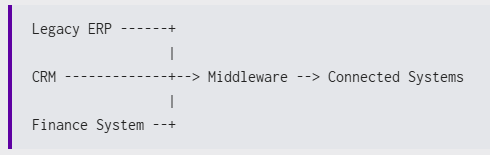
Imagine an organization with three applications using different customer identifiers.
Middleware can normalize the data before transferring it between systems.
Benefits
- Centralized integration rules.
- Reusable transformations.
- Consistent monitoring.
- Reduced point-to-point connections.
Challenges
Middleware also introduces infrastructure, maintenance, and operational complexity.
Developers should evaluate whether the additional layer is justified by the number and complexity of integrations.
6. Pattern Five: Robotic Process Automation
Sometimes an application has no supported database access, export mechanism, or integration interface.
Robotic Process Automation (RPA) can interact with its existing user interface.
For example, an automation might:
- Open the legacy application.
- Authenticate using an approved account.
- Locate a customer record.
- Extract permitted information.
- Enter the information into another application.
- Record the operation's result.
RPA can be effective for stable, repetitive tasks.
However, UI changes, authentication updates, and unexpected dialogs can break the automation.
Use RPA when more reliable integration interfaces are unavailable, not simply because it is quick to demonstrate.
7. Pattern Six: Custom Adapters and API Wrappers
A custom adapter creates a controlled interface around a legacy application.
This is particularly useful when multiple modern applications need access to the same legacy functionality.
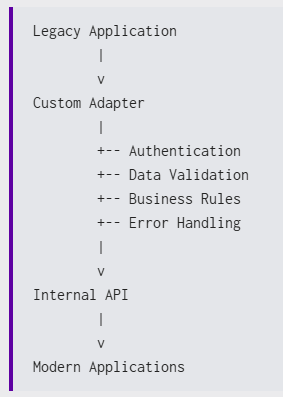
Example: A simple FastAPI wrapper
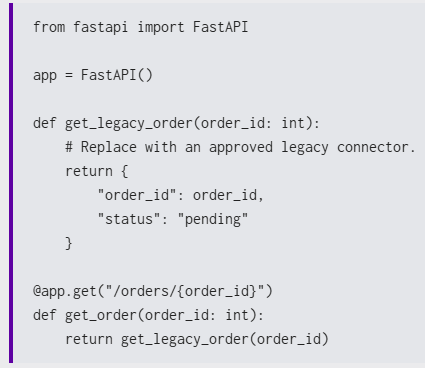
This example illustrates the wrapper pattern rather than a production-ready implementation.
A real adapter requires authentication, authorization, input validation, secure data access, logging, and failure handling.
The advantage is that modern applications interact with a controlled interface instead of depending directly on legacy implementation details.
8. Choosing the Right Integration Pattern
Different integration requirements call for different solutions.
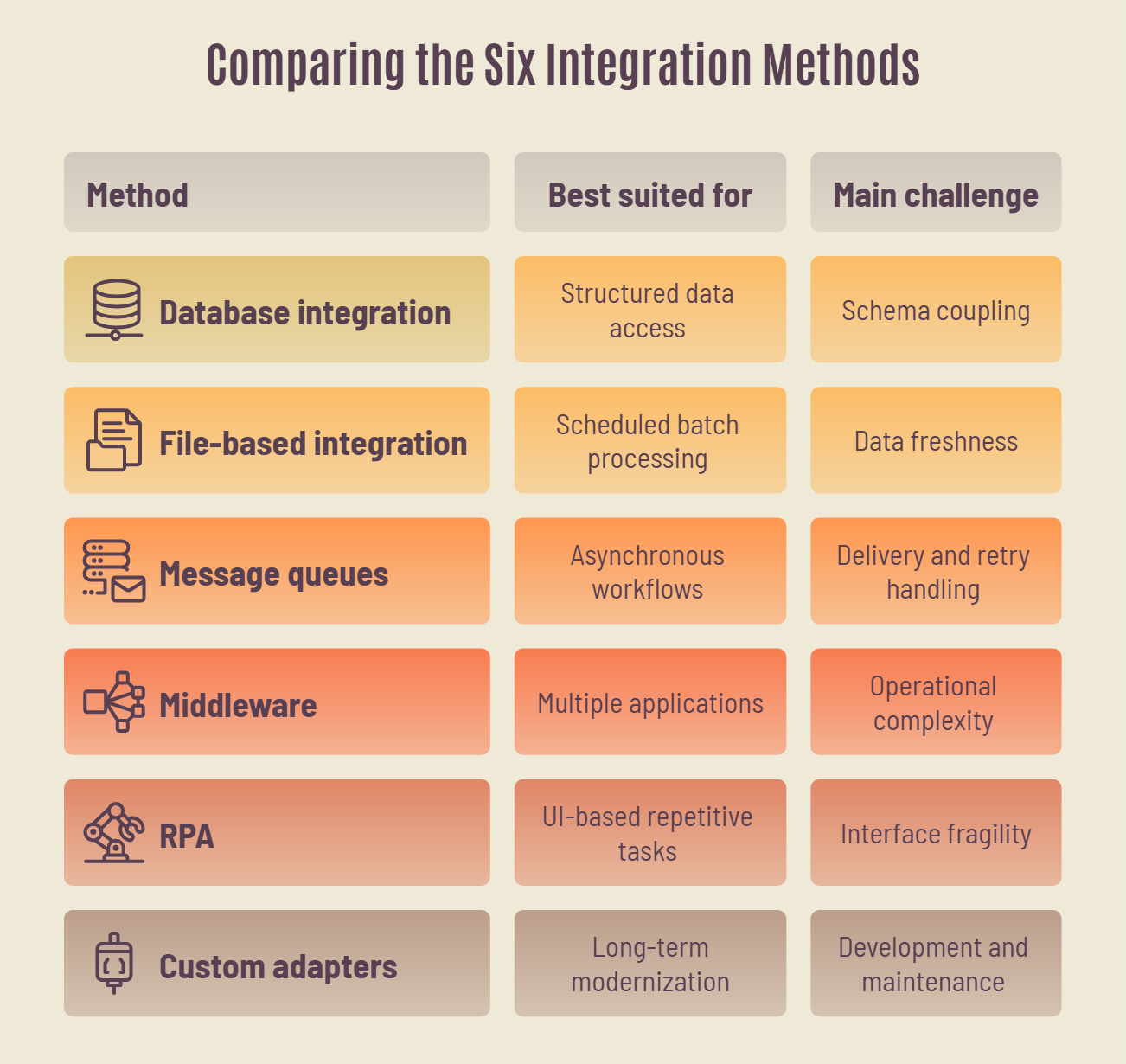
For example:
Scenario A: A finance system needs daily transaction exports.
A secure file-based integration may be sufficient.
Scenario B: An ERP needs to notify several downstream applications when orders change.
A connector combined with message queues may be appropriate.
Scenario C: A legacy application will remain operational for years, but multiple modern services need its data.
A custom adapter may provide a maintainable integration boundary.
The best approach depends on business requirements, not technology trends.
9. Security and Reliability Checklist
Legacy integration projects frequently fail because teams focus on transferring data but overlook operational requirements.
Before deploying an integration, verify that you have addressed:
- Authentication: Use approved identities and secure credential management.
- Authorization: Apply least-privilege permissions.
- Encryption: Protect sensitive data in transit and at rest.
- Validation: Reject malformed or unauthorized records.
- Error handling: Implement retries and clear failure reporting.
- Idempotency: Prevent duplicate operations.
- Observability: Monitor integration health and processing delays.
- Documentation: Record dependencies, data mappings, and recovery procedures.
Also define which system is authoritative for each shared data field.
Without clear ownership, two connected applications may repeatedly overwrite each other's information.
10. Integration vs. Modernization: When Should You Replace the System?
Not every legacy application needs immediate replacement.
If the software is stable, secure, and continues to support important workflows, integration may be the better short-term choice.
However, replacement or phased modernization deserves consideration when:
- Vendor support has ended.
- Security weaknesses cannot be addressed.
- Maintenance becomes increasingly expensive.
- Every new requirement needs another workaround.
- Existing architecture limits business growth.
A custom adapter can sometimes support both goals: maintaining current operations while gradually migrating functionality into modern services.
How ChampSoft Supports Legacy Integration
Legacy integration requires more than connecting applications.
Developers must understand data ownership, business rules, security requirements, and long-term system dependencies.
ChampSoft's system integration services help businesses connect applications using suitable integration architectures.
Its software engineering services support custom development and modernization projects.
ChampSoft also follows a structured software development process covering planning, architecture, implementation, testing, and deployment.
Final Thoughts
Integrating legacy systems without APIs is not necessarily a temporary workaround.
With the right architecture, it can be a reliable strategy for extending the life of valuable business applications.
Database connectors, secure file transfers, message queues, middleware, RPA, and custom adapters each solve different problems.
The most important engineering decision is choosing an approach that balances simplicity, security, reliability, and maintainability.
A successful integration doesn't just connect two applications. It creates a dependable foundation for future changes.
Read the Complete ChampSoft Guide
This Hashnode article focuses on practical architecture patterns for developers.
For more information about integration strategies, common challenges, and modernization decisions, read the original article:
How to Integrate Two Systems Without APIs — ChampSoft
If your organization needs help connecting existing applications, you can also contact ChampSoft to discuss your integration requirements.
Originally published by ChampSoft. This version has been adapted for Hashnode's developer community.
Comments
Join the discussionNo comments yet. Be the first to comment.